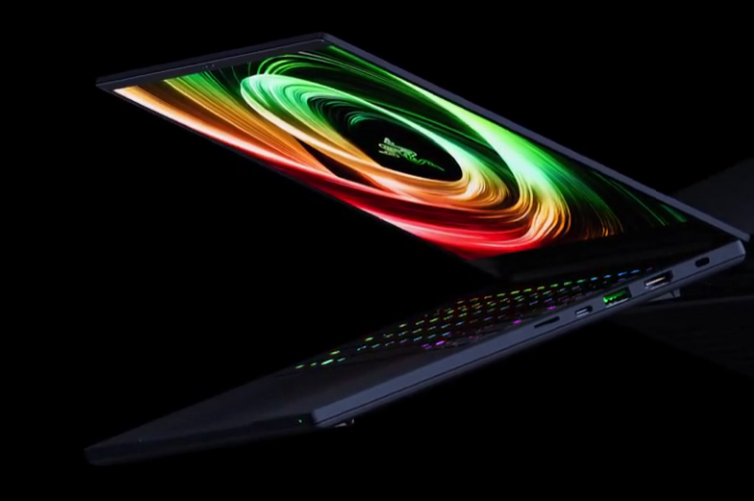
The Razer Blade 14 stands out as one of the most compact and high‑performance options in the thin gaming laptop market. Built from a premium aluminum chassis and enhanced with a vapor chamber cooling system, it delivers the power of a full desktop experience in a smaller footprint.
With updated Razer Blade specs and elegant finishes, including the sleek Mercury White edition, the Blade 14 remains a top choice for users who value both performance and portability.
What Makes the Razer Blade 14 a Premium Gaming Laptop
The Blade 14's premium feel comes from its CNC‑milled aluminum body, crafted from a single block for strength and precision.
The design is minimalist yet durable, featuring clean lines and a solid build that resists flexing. This structure not only looks professional but also improves cooling efficiency and long‑term durability compared to plastic housings.
The laptop's refined construction allows it to handle powerful hardware while staying slim and light. Its attention to detail, like tight hinge movement, smooth edges, and evenly distributed weight, reflects Razer's focus on high‑quality engineering.
Key Razer Blade Specs
Inside, the Razer Blade 14 carries serious performance credentials. It typically features AMD Ryzen 9 processors combined with NVIDIA GeForce RTX 4060 or 4070 GPUs, offering both gaming and creative power. These components deliver strong frame rates in modern titles and make multitasking or media rendering smooth and efficient.
Display options include a 14‑inch QHD 240Hz panel with 100% DCI‑P3 color accuracy. The screen's sharp brightness and fast refresh rate provide vivid visuals whether gaming or editing content. It supports up to 32GB DDR5 RAM and PCIe 4.0 SSD storage for quick load times and efficient workflow management.
Connectivity is robust, offering USB‑C, USB‑A, HDMI 2.1, and audio ports, along with Wi‑Fi 6E for stable connections. Battery endurance reaches up to 10 hours under lighter workloads, impressive for a thin gaming laptop of its caliber.
Vapor Chamber Cooling Efficiency
Razer's vapor chamber cooling system sets it apart from most compact gaming machines. Instead of relying on standard heat pipes, the vapor chamber spreads heat quickly across a larger surface for even dissipation.
A liquid inside evaporates and condenses in a sealed loop, efficiently moving warmth away from key components like the CPU and GPU.
This system allows for quieter fan performance and better sustained speeds during gameplay or heavy workloads. Users experience cooler surfaces, stable performance, and less thermal throttling, all while maintaining a slim chassis profile.
A True Thin Gaming Laptop
At just 0.7 inches thick and around 3.9 pounds, the Razer Blade 14 fits neatly into backpacks without compromising on capability. Its ergonomic design helps it transition easily between office, classroom, and gaming settings.
Razer's engineering ensures structural stability despite the small footprint, giving users confidence in its durability over time.
The combination of lightweight construction, full‑power GPUs, and long battery life gives the Blade 14 a rare balance, making it not only one of the thinnest gaming laptops available but also one of the most practical for daily use.
The Mercury White Edition
The Razer Blade 14 Mercury White edition takes the same performance and redefines its look. The matte white finish provides a clean, modern aesthetic and resists fingerprints better than darker models. The silver Razer logo adds subtlety, making this variant suitable for professionals who prefer understated style.
Internally, it maintains identical Razer Blade specs found in the black version. Users get the same Ryzen processors, RTX graphics, and high‑refresh display options, wrapped in a chassis designed to blend with modern office or studio setups.
Read more: Why the Lenovo ThinkPad T14 Defines ThinkPad Reliability and the Ideal Business Ultrabook Experience
How It Compares to Other Gaming Laptops
When compared with rivals like the ASUS ROG Zephyrus G14 or Alienware x14, the Razer Blade 14 consistently ranks high for build quality and performance stability. The Zephyrus G14 matches it on specs but uses a magnesium‑alloy frame that feels less dense. Alienware's model features bold styling but runs thicker and louder under load.
Razer's vapor chamber design results in quieter operation and better thermal distribution. The all‑aluminum body feels sturdier, and the display's crisp color accuracy gives it an edge for creative professionals. While often priced higher, the Blade 14 justifies its premium through refined craftsmanship and consistent reliability.
Who the Razer Blade 14 Is For
The Razer Blade 14 fits users who need serious speed without carrying bulky hardware. Gamers benefit from smooth frame rates and responsive performance, while video editors, designers, and developers appreciate its processing efficiency and calibrated screen.
Its portability makes it convenient for those who travel often or shift between gaming and productivity environments.
Its elegant look, especially in Mercury White, also appeals to professionals who prefer a minimal appearance rather than a typical RGB‑heavy setup. With dependable cooling, metal build, and strong specs, it serves reliably as both a creative workstation and entertainment hub.
Razer Blade 14: Setting a Standard for Thin Gaming Power
The Razer Blade 14 continues to define what a thin gaming laptop can achieve when design and performance meet precision. Its premium aluminum chassis, efficient vapor chamber cooling, and balanced Razer Blade specs make it one of the most adaptable portable machines in its class.
The Mercury White edition reinforces Razer's approach of blending high performance with understated style. Whether for play or professional use, the Blade 14 remains a benchmark device that shows portability can coexist with uncompromising hardware and craftsmanship.
Frequently Asked Questions
1. Can the RAM or storage be upgraded on the Razer Blade 14?
The RAM is soldered to the motherboard, so it isn't user‑upgradeable. However, the SSD can be replaced or upgraded with a compatible PCIe 4.0 drive.
2. Does the Razer Blade 14 support external GPUs (eGPUs)?
Yes. Through its USB‑C port with Thunderbolt 4 or USB 4 support (depending on model), users can connect an external GPU to boost graphics performance.
3. How loud are the fans during heavy gaming sessions?
Fan noise increases under high loads but remains moderate thanks to the vapor chamber cooling. The system prioritizes balanced acoustics and thermal efficiency.
4. Is the Mercury White model more prone to discoloration or scratches?
No. The matte coating is anodized and resistant to fading and minor scratching, maintaining its clean appearance longer than many lighter laptop finishes.
ⓒ 2026 TECHTIMES.com All rights reserved. Do not reproduce without permission.


