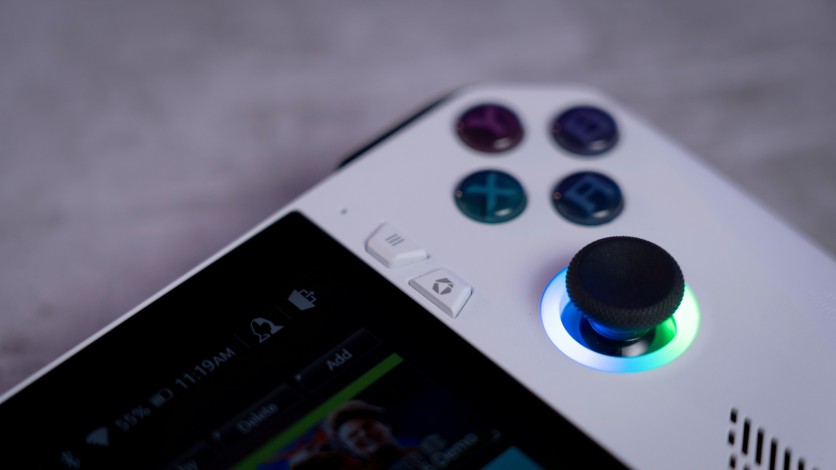
Portable PC gaming has rapidly matured, and the Steam Deck OLED vs ROG Ally debate highlights how far handheld gaming has come. These two devices represent different philosophies: Valve prioritizes efficiency and console-like simplicity, while ASUS pushes raw power and Windows flexibility. Both aim to deliver AAA gaming anywhere, but their strengths appeal to different players.
This handheld gaming comparison breaks down performance, battery life, displays, and software ecosystems to clarify which device fits specific playstyles. Whether you value long sessions on the go or maximum frame rates at higher resolutions, understanding these differences is essential for choosing the right portable PC gaming experience.
Performance Benchmarks in Handheld Gaming Comparison
Performance is the headline topic in any handheld gaming comparison, especially when evaluating Steam Deck OLED vs ROG Ally. Raw benchmark data consistently favors ASUS, particularly in modern AAA titles. The Ryzen Z1 Extreme delivers higher ceiling performance when power limits are relaxed. This makes the Ally more appealing to users prioritizing frame rates over efficiency.
- ROG Ally Ryzen Z1 Extreme shows a 12–50% performance lead over Steam Deck OLED depending on resolution and TDP limits.
- Shadow of the Tomb Raider at 15W TDP: Ally averages ~57 FPS at 720p medium, while Steam Deck OLED sits closer to ~45 FPS.
- Higher wattage scaling benefits the Ally, widening the performance gap in docked or plugged-in scenarios.
- Horizon Zero Dawn with FSR enabled: Ally reaches ~79 FPS versus Deck's ~60 FPS.
- Cyberpunk 2077 performance favors Ally by 12–20%, confirming its advantage in demanding workloads.
- Portable PC gaming focused on raw power clearly favors the ROG Ally over Valve's efficiency-first approach.
Display and Battery Life for Portable PC Gaming
Display quality and battery endurance define real-world portable PC gaming usability. Steam Deck OLED prioritizes visual immersion and efficiency, while the ROG Ally emphasizes refresh rate and responsiveness. Each device targets a different style of play. The trade-off between image quality and performance smoothness is central to this comparison.
- Steam Deck OLED features a 7.4-inch HDR OLED panel with infinite contrast and up to 1,000 nits peak brightness.
- OLED contrast delivers deeper blacks, making darker and atmospheric games more immersive.
- ROG Ally's 7-inch 120Hz IPS display with VRR offers smoother motion for fast-paced shooters.
- Competitive players may prefer Ally's 120Hz refresh rate, while cinematic gamers favor the Deck's OLED clarity.
- Steam Deck OLED battery life averages 3–6 hours, excelling in indie games, emulation, and capped AAA titles.
- ROG Ally typically lasts 1.5–3 hours at high performance, with slight improvements in the Ally X variant.
- For extended handheld sessions away from outlets, Steam Deck OLED remains more practical.
Software Ecosystem and Ergonomics in Steam Deck OLED vs ROG Ally
Software experience shapes how seamless daily gaming feels in Steam Deck OLED vs ROG Ally. Valve focuses on a console-like interface, while ASUS offers maximum platform compatibility. Ergonomics further separate long-session comfort from flexibility. These differences often matter more than raw performance numbers.
- SteamOS provides instant suspend and resume, working reliably across thousands of verified titles.
- The Deck boots directly into gaming, reducing background processes and power drain.
- ROG Ally runs Windows 11, supporting Epic Games Store, Xbox Game Pass, Battle.net, and mods without workarounds.
- Windows flexibility requires more manual tuning, including driver updates and power management.
- Steam Deck OLED trackpads function like a mouse, improving strategy games, RPGs, and desktop navigation.
- Wider grips on the Deck improve comfort during long handheld gaming sessions.
- ROG Ally's Xbox-style controller layout suits FPS and action games naturally.
- Dual USB4 ports give the Ally superior docking and productivity flexibility, extending beyond pure gaming use.
Conclusion
Steam Deck OLED vs ROG Ally highlights two strong but contrasting approaches to portable PC gaming. Valve delivers efficiency, longer battery life, and a streamlined ecosystem that feels closer to a console experience. ASUS prioritizes raw power, higher refresh rates, and Windows versatility, appealing to users who want fewer platform limitations.
In this handheld gaming comparison, the Steam Deck OLED stands out as the better unplugged device, while the ROG Ally shines when performance and software freedom matter most. Choosing between them depends on whether battery endurance or maximum flexibility defines your ideal handheld gaming experience.
Frequently Asked Questions
1. Which is better for performance: Steam Deck OLED vs ROG Ally?
The ROG Ally delivers stronger performance overall due to its Ryzen Z1 Extreme processor. It consistently achieves higher frame rates in AAA games compared to the Steam Deck OLED. This advantage becomes more noticeable at higher wattage settings. For performance-focused portable PC gaming, the Ally is the better choice.
2. Is Steam Deck OLED better for battery life?
Yes, Steam Deck OLED offers significantly better battery life than the ROG Ally. Most users can expect 3–6 hours depending on the game and settings. SteamOS efficiency plays a major role in this advantage. For longer handheld sessions, the Deck is more reliable.
3. Which handheld gaming comparison favors casual players?
Casual players often prefer the Steam Deck OLED due to its console-like interface and ease of use. SteamOS requires less setup and offers instant suspend and resume. The OLED display also enhances visual enjoyment. These features make it more accessible for non-technical users.
4. Can the ROG Ally replace a gaming PC?
The ROG Ally can function as a compact Windows gaming PC when docked. Its USB4 support allows external displays, keyboards, and even GPUs. While it won't fully replace a high-end desktop, it offers impressive versatility. For portable PC gaming with desktop flexibility, it is a strong option.
ⓒ 2026 TECHTIMES.com All rights reserved. Do not reproduce without permission.


