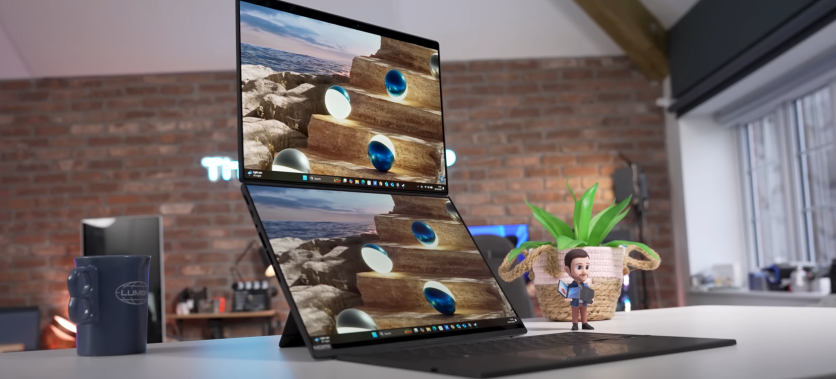
The ASUS Zenbook Duo 2026 refines the Zenbook Duo dual-screen laptop concept with two stunning 14-inch OLED displays and next-generation Intel Lunar Lake processors. Built for multitaskers and creators, it combines portability with dual-screen productivity through a detachable keyboard and built-in kickstand system. With up to an Intel Core Ultra 9 chip, 32GB RAM Zenbook configuration, and dual 3K 120Hz touchscreens, the hardware aims squarely at professionals who need flexibility.
Zenbook Duo performance feels responsive in creative apps, heavy browsing sessions, and multitasking workflows. ASUS ScreenXpert software ties the experience together, enabling smooth window management across both panels. While thermals and battery life dual-screen usage require realistic expectations, the overall package positions this model as one of the most ambitious ultraportables of 2026.
Is the ASUS Zenbook Duo Worth It?
The ASUS Zenbook Duo 2026 stands out because the Zenbook Duo dual-screen laptop design offers flexibility that single-screen ultrabooks simply cannot match. Users can run editing software on one display while referencing documents, timelines, or chats on the other without external monitors. That dual 14-inch OLED screen setup dramatically improves multitasking efficiency.
Zenbook Duo performance supports demanding workflows, including 4K video editing, large Photoshop projects, and 20+ Chrome tabs without major slowdowns. The premium pricing reflects its innovative hardware and OLED technology. For creators and productivity-focused users, the expanded workspace justifies the investment more clearly than for casual users.
ASUS Zenbook Duo 2026 Battery Life with Dual Screens
Battery performance on the ASUS Zenbook Duo 2026 depends heavily on how both OLED displays are used. Dual-screen productivity enhances workflow but naturally increases power consumption compared to single-screen ultrabooks.
- 6–8 Hours with Dual Screens Active – Mixed productivity use with both OLED panels at higher refresh rates delivers around 6–8 hours of battery life dual-screen operation.
- Up to 12 Hours in Single-Screen Mode – Disabling the secondary display and lowering brightness can significantly extend runtime.
- Adaptive Refresh Rate Optimization – The system adjusts refresh rates dynamically to reduce unnecessary power draw.
- Smart Panel Management – Automatic display control minimizes drain when the second screen is not actively used.
- ASUS ScreenXpert Software Tools – Screen blanking features help preserve battery by turning off the secondary display during idle moments.
- Balanced Endurance – While it won't match traditional single-screen ultrabooks, power optimization features make it manageable for a full workday with charging access.
Can You Use ASUS Zenbook Duo 2026 as a Tablet?
The detachable keyboard transforms the ASUS Zenbook Duo 2026 into a large-format tablet. With both dual 14-inch OLED screens accessible via touch, it supports stylus input and flexible layouts for note-taking or presentations. The built-in kickstand allows multiple viewing angles without external accessories.
However, at around 1.65kg, it is heavier than conventional tablets. Zenbook Duo performance remains fluid in tablet mode for browsing, drawing, and media consumption. It works best as a desk-based tablet rather than something held for extended periods.
ASUS Zenbook Duo 2026 Design and Core Specifications
The ASUS Zenbook Duo 2026 blends premium engineering with forward-thinking dual-screen productivity. Its refined build supports flexible usage modes without sacrificing portability. Combined with high-end internal hardware, the Zenbook Duo dual-screen laptop is built for creators and multitaskers who demand both power and versatility.
- Refined Dual-Screen Hinge Design – The elevated secondary display improves ergonomics and airflow, helping with cooling during extended use. Slim bezels keep the footprint compact despite the dual 14-inch OLED screens.
- Premium Aluminum Chassis – Lightweight yet rigid construction makes the ASUS Zenbook Duo 2026 travel-friendly while maintaining durability.
- Detachable Keyboard Flexibility – The magnetic detachable keyboard can sit over the lower display or operate wirelessly, enabling laptop, dual-screen workstation, and tablet-style configurations.
- Intel Lunar Lake CPU Power – Configurations up to Core Ultra 9 288V deliver strong AI acceleration and efficient multitasking performance.
- 32GB RAM Zenbook Configuration – High-speed LPDDR5X memory ensures smooth multitasking and long-term usability for demanding applications.
- Dual 14-Inch 3K 120Hz OLED Displays – Both panels feature 2880x1800 resolution, 120Hz refresh rates, and wide DCI-P3 color coverage for sharp visuals and creative precision.
- Fast PCIe SSD Storage – Up to 1TB of high-speed storage supports large creative files and quick application loading.
Zenbook Duo Performance, Software, and Connectivity
Zenbook Duo performance is powered by the Intel Lunar Lake CPU, delivering strong multi-core results in creative workloads and multitasking scenarios. Video exports, rendering tasks, and heavy browser sessions run smoothly for a thin-and-light device, while 1080p gaming remains playable depending on settings.
Thermal limits can reduce peak output during extended heavy loads, but overall performance stays consistent for productivity-focused users. ASUS ScreenXpert software enhances the Zenbook Duo dual-screen laptop experience with window snapping, app grouping, and quick display mode switching that makes multitasking feel natural.
Connectivity on the ASUS Zenbook Duo 2026 supports professional workflows with two Thunderbolt 4 ports, HDMI 2.1, and USB-A 3.2. Wi-Fi 7 and Bluetooth ensure fast wireless performance, while Thunderbolt enables docking stations and high-speed storage expansion.
Combined with customizable ScreenXpert layouts and dual-screen productivity tools, the laptop delivers a cohesive ecosystem that supports creators, remote workers, and multitaskers without feeling experimental.
Maximize ASUS Zenbook Duo 2026 Dual-Screen Potential
The ASUS Zenbook Duo 2026 demonstrates how a Zenbook Duo dual-screen laptop can reshape mobile productivity. With strong Zenbook Duo performance and flexible hardware modes, it suits creators, multitaskers, and professionals who value screen space. The dual OLED setup transforms workflows from cramped to expansive.
While battery life dual-screen usage requires mindful management, the productivity gains outweigh the tradeoffs for many users. Paired with ASUS ScreenXpert software, the device feels polished and purposeful. For those seeking innovation in a portable form factor, this model sets a clear benchmark in 2026.
Frequently Asked Questions
1. How powerful is the ASUS Zenbook Duo 2026 for creative work?
Zenbook Duo performance is well-suited for video editing, photo manipulation, and multitasking. The Intel Lunar Lake CPU and 32GB RAM Zenbook configuration handle demanding apps smoothly. Dual OLED screens improve workflow efficiency. It performs best in short to moderate sustained workloads.
2. Does using both screens significantly reduce battery life?
Yes, battery life dual-screen usage shortens runtime compared to single-screen mode. Expect around 6–8 hours with both displays active under mixed workloads. Power-saving features can extend usage when needed. Managing brightness and refresh rate also helps conserve energy.
3. Is the Zenbook Duo dual-screen laptop good for travel?
The aluminum chassis keeps it durable and portable at 1.65kg. It fits in standard laptop bags despite housing dual 14-inch OLED screens. The detachable keyboard adds flexibility for tight spaces. However, frequent travelers may want to carry a charger due to battery demands.
4. What makes ASUS ScreenXpert software important?
ASUS ScreenXpert software optimizes dual-screen productivity. It enables seamless app management, custom layouts, and gesture controls. Without it, multitasking across two displays would feel fragmented. The software ties the hardware experience together effectively.
ⓒ 2026 TECHTIMES.com All rights reserved. Do not reproduce without permission.


