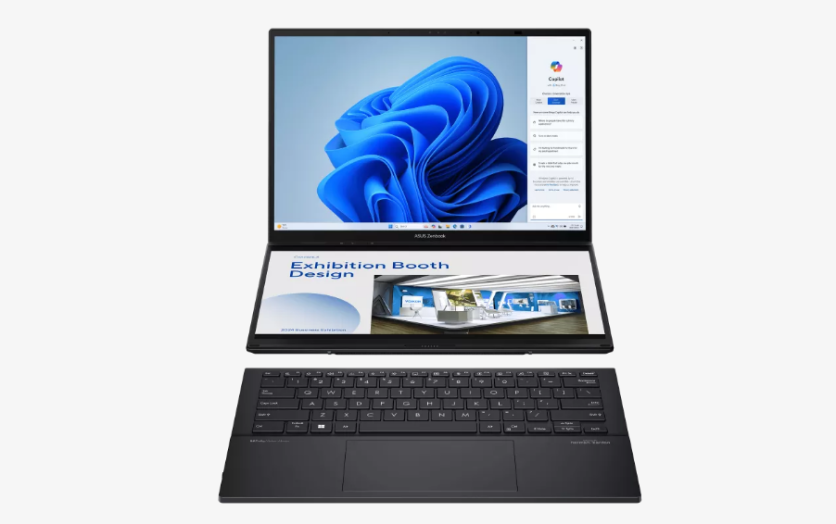
Dual‑screen and tri‑screen laptops have moved from trade show curiosities to real options for people who work on the go. These devices promise more screen space in a portable form factor, but their actual impact on productivity depends heavily on how they are used, and who is using them.
What Is a Dual‑Screen Laptop for Work?
A dual‑screen laptop for work is a notebook that combines a primary display with a second screen built into the chassis or attached as an integrated extension. In some designs, the secondary display sits above the keyboard; in others, it folds out or slides from behind the main panel.
The goal is to offer more room for windows and apps without carrying a separate monitor.
Manufacturers usually position these machines for professionals who juggle multiple tasks at once. Creators, developers, and knowledge workers can keep reference materials, tools, or communication apps on the extra display while dedicating the main screen to primary work.
For remote workers and digital nomads, a dual‑screen laptop can function as a compact, self‑contained multi‑screen laptop setup instead of a laptop plus external monitor.
Are Dual‑Screen Laptops Good for Work?
For certain types of work, dual‑screen laptops can be genuinely useful. When someone spends hours comparing documents, monitoring chats while writing, or keeping an eye on dashboards, a second display can cut down on window switching.
Having reference material on the secondary screen while editing or coding on the main display often feels more natural than constantly jumping between windows.
However, the benefit is not universal. Some people find that the novelty wears off if their tasks rarely require more than one or two apps at a time.
Others discover that cramped keyboard layouts or odd touchpad placement (common compromises in dual‑screen designs) offset the advantages of extra screen space. The value depends on whether the user's work genuinely involves frequent, parallel tasks.
What Is a Tri‑Screen Laptop Setup?
A tri‑screen laptop setup typically uses a standard notebook combined with two additional screens that attach to the sides or top of the main display.
These add‑on panels can be slim monitors that clamp onto the lid or slide‑out units housed in a frame behind the laptop screen. Once deployed, they create a three‑panel workspace suited to heavy multitasking.
This kind of multi‑screen laptop setup appeals to traders, analysts, video editors, programmers, and others who live in complex environments full of charts, timelines, logs, and communication tools.
Instead of stacking windows on a single screen, they can dedicate one panel to the primary task, another to tools or preview windows, and a third to messaging or monitoring.
Do Triple‑Screen Laptops Really Improve Productivity?
Tri‑screen configurations tend to show their strengths in specialized workflows. A video editor might keep the timeline on the center display, preview on one side, and file browser or notes on the other. A developer could run code on the main screen, logs or server dashboards on one side, and documentation or chat on the other.
In these cases, tri‑screen laptop productivity can feel higher because critical information remains visible without overlapping.
That said, more screens do not automatically guarantee better focus. Some users find three screens visually overwhelming, especially if they fill every panel with competing apps and notifications.
Others discover that the posture required to constantly scan wide arrays of displays can be tiring. The net effect depends on how intentionally the three screens are configured and how disciplined the user is with notifications and window layout.
Folding Laptop Displays vs Slide‑Out Laptop Screens
What Are Folding Laptop Displays?
Folding laptop displays use flexible OLED panels and specialized hinges to enable one large screen to bend in half. When folded, the device takes up roughly the footprint of a conventional laptop; when unfolded, it becomes a wide or tall single display, acting more like a small monitor.
Some designs support using one half as a virtual keyboard or pen input surface, while others favor external keyboards.
The main advantage of folding laptop displays is the ability to carry what is effectively a larger monitor in a compact package. With the screen fully open, there is ample vertical or horizontal space for documents, timelines, or multiple windows.
The continuous canvas also eliminates bezels between panels, which can be appealing for creative work or reading.
What Are Slide‑Out Laptop Screens?
Slide‑out laptop screens rely on rigid panels that extend from behind or beside the main display. A typical configuration involves one or two additional screens that slide from a housing attached to the back of the laptop lid. When stored, everything sits behind the main screen; when deployed, the side panels create a dual‑screen or tri‑screen layout.
These slide‑out laptop screens are aimed at users who want a traditional multi‑monitor feel. Each panel acts as a separate display with its own boundaries, making it easy to dedicate each to a specific role. In meetings or collaborative sessions, one side screen can face a client or colleague while the user continues working on the main display.
Which Is Better for Work: Folding or Slide‑Out?
Choosing between folding and slide‑out systems depends on the task mix and work style. Folding laptop displays suit users who prefer a single large canvas—designers, readers, or anyone who benefits from tall documents, long timelines, or immersive workspaces.
Slide‑out screens are better for those who want clear separation of tasks, such as keeping communication, reference, and creation in distinct spaces.
Portability and durability also matter. Folding displays rely on flexible panels and complex hinges, which can be more fragile and expensive to repair. Slide‑out mechanisms add mechanical wear points and mass to the lid.
Frequent travelers must weigh whether protecting a foldable screen or carrying the extra bulk of rigid panels is the more manageable compromise.
Are Multi‑Screen Laptop Setups Actually Useful for Work?
Benefits of Using a Dual‑Screen Laptop
The primary benefit of a dual‑screen laptop for work is reducing the need to constantly switch windows. A writer can keep research on one screen and a draft on the other; a project manager can monitor chat and calendars without burying the main task.
This smoother flow often makes work feel less fragmented, particularly when tasks involve cross‑referencing information.
Dual screens also support more organized workspaces. Users can assign roles to each display, such as dedicating the secondary screen to communication and tools while preserving the main display for deep‑focus tasks. This structure can help some people maintain concentration while still staying aware of important updates.
Advantages of Triple‑Screen Laptops Over Dual‑Screen
Tri‑screen setups add another layer of separation. Instead of squeezing multiple secondary tasks onto one extra panel, users can give each major category—creation, reference, communication—its own space.
For workloads that genuinely need three or more applications in constant view, tri‑screen laptop productivity can feel noticeably higher than even a dual‑screen arrangement.
However, there is a point of diminishing returns. For many office workers, students, or casual users, two well‑arranged screens already cover most needs. Adding a third screen may introduce more complexity than benefit if the work itself does not demand multiple dashboards, previews, or timelines.
Are Folding and Slide‑Out Laptop Screens Worth It for Modern Workflows?
For people whose daily tasks demand constant multitasking, visual monitoring, and cross‑referencing, multi‑screen laptop setups can offer real advantages.
A dual‑screen laptop for work can streamline common workflows by dedicating space to reference material and communication, while tri‑screen laptop productivity setups can support more complex, tool‑heavy roles.
Folding laptop displays and slide‑out laptop screens each bring distinct trade‑offs in ergonomics, durability, and portability, so matching the design to actual habits is crucial. When the hardware aligns with the work, these evolving form factors can feel less like gimmicks and more like practical tools that extend what a portable computer can do.
Frequently Asked Questions
1. Do dual‑screen laptops replace the need for an external monitor?
They can reduce reliance on an external monitor for travel and flexible setups, but many users still prefer a full‑size monitor at a fixed desk for long work sessions.
2. Are multi‑screen laptop setups good for battery‑only use?
Not really; extra displays draw more power, so these setups work best when plugged in or when users accept noticeably shorter battery life.
3. Can multi‑screen laptops help with eye strain?
They can reduce strain from constant window switching, but if brightness, font size, and viewing distance are not configured well, they may also increase visual fatigue.
4. Is it harder to protect dual‑screen and tri‑screen laptops when traveling?
Yes, because additional panels, hinges, and slide‑out parts are more vulnerable to bumps and pressure, so they typically need sturdier cases and more careful handling.
ⓒ 2026 TECHTIMES.com All rights reserved. Do not reproduce without permission.


