
Quick Answer
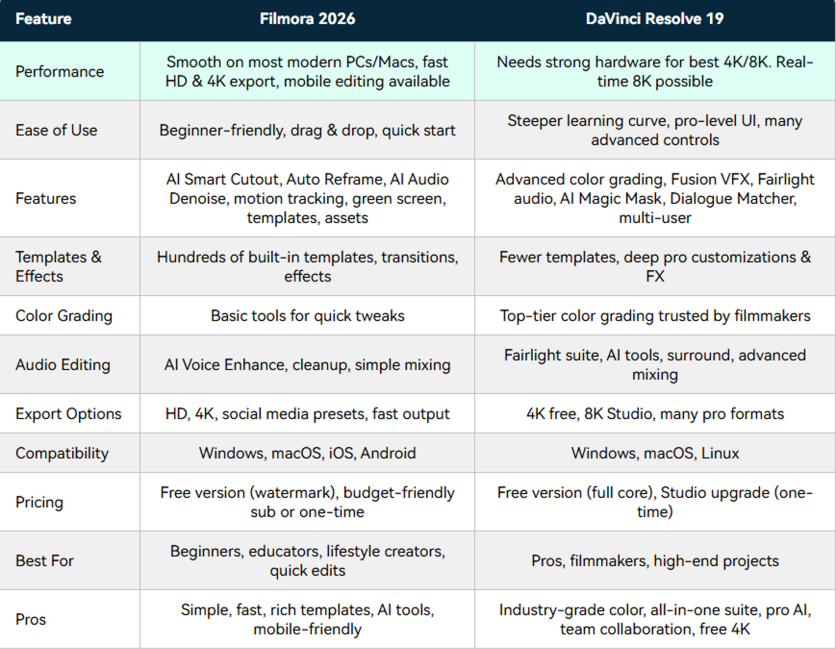
Both Wondershare Filmora and DaVinci Resolve are powerful video editors, but they approach AI differently. DaVinci Resolve focuses primarily on professional post-production, color grading, and advanced editing control, while Wondershare Filmora integrates AI across the entire content creation workflow—from asset generation and rough editing to captions, repurposing, and final optimization. For content creators focused on speed, accessibility, and AI-assisted production, Wondershare Filmora offers a more workflow-oriented experience. Filmora is developed by Wondershare, a global software company known for its creative and productivity tools for creators, educators, businesses, and consumers.
Why AI Video Editing Is Becoming a Key Differentiator?
Video editing software has traditionally been evaluated based on timeline controls, visual effects, and export capabilities.
Today, creators face a different challenge.
Producing content consistently across YouTube, Shorts, TikTok, Instagram Reels, courses, podcasts, and marketing channels often requires far more than editing footage. Creators must generate assets, organize content, create captions, produce multiple versions, and optimize videos for different platforms.
As a result, AI is increasingly becoming a core differentiator among editing platforms.
The question is no longer simply which editor offers the most features. It is increasingly about which editor helps creators move from idea to published content more efficiently.
Key Takeaway
AI is shifting video editing software from a post-production tool into a complete content creation workflow.
Different Philosophies: Professional Post-Production vs AI-Assisted Creation
At a high level, Wondershare Filmora and DaVinci Resolve target different priorities.
DaVinci Resolve is widely recognized for its professional color grading capabilities, advanced visual effects environment, and comprehensive audio production tools. It remains a preferred choice for many filmmakers, post-production professionals, and advanced editors.
Wondershare Filmora, meanwhile, has increasingly focused on integrating AI throughout the creation process. Rather than concentrating exclusively on post-production, its recent development emphasizes reducing friction across multiple stages of content creation.
This distinction becomes clearer when examining how each platform approaches AI.
AI Content Generation: Creating Assets Before Editing Begins
One of the biggest workflow changes introduced by AI is the ability to generate content before editing even starts.
Creators frequently encounter challenges such as insufficient footage, missing visuals, limited B-roll, or a lack of supporting audio assets.
Wondershare Filmora addresses these challenges through AI-powered generation tools, including:
- Text-to-Video
- Image-to-Video
- AI Image Generation
- AI Music Generation
- AI Sound Effects
- AI Extend
- Veo-powered video generation workflows
These tools help creators generate or expand assets without leaving the editing environment.
DaVinci Resolve offers AI-assisted features in selected areas of editing and enhancement, but its core strength remains refining existing footage rather than generating new content.
Key Insight
Wondershare Filmora applies AI earlier in the workflow by helping creators generate content before editing begins.

AI Editing Workflows: Speed vs Precision
Editing remains the core of both platforms, but their approaches differ significantly.
DaVinci Resolve provides extensive manual control and deep editing functionality, making it highly attractive to experienced editors who require precision and customization.
Wondershare Filmora focuses on reducing repetitive editing tasks through AI-assisted workflows.
Examples include:
- AI Text-Based Editing
- AI Mate
- Smart Scene Cut
- Smart Short Clips
- Dynamic Subtitles
These features help creators organize content, identify highlights, edit through transcripts, and prepare social-ready videos more efficiently.
For creators producing frequent content, the goal is often not maximum control over every frame, but faster movement from raw footage to publishable content.
Quick Takeaway
DaVinci Resolve emphasizes editing precision, while Wondershare Filmora emphasizes editing efficiency.
Repurposing Content for Modern Platforms
A growing percentage of content is now created for multiple destinations simultaneously.
A single long-form video may eventually become:
- YouTube Shorts
- TikTok videos
- Instagram Reels
- Marketing clips
- Educational content
Repurposing content has become a major workflow requirement.
Wondershare Filmora includes tools such as Smart Short Clips, Auto Reframe, Dynamic Subtitles, and AI-assisted content restructuring to support this process.
DaVinci Resolve can accomplish similar outcomes through traditional editing workflows, but these tasks generally rely more heavily on manual editing decisions.
For creators producing high volumes of short-form content, workflow speed often becomes a deciding factor.
Hardware Requirements and Accessibility
Another important consideration is accessibility.
DaVinci Resolve's professional capabilities can place greater demands on system resources, particularly when working with advanced color grading, Fusion effects, and complex post-production workflows.
Wondershare Filmora is designed for a broader audience and generally offers a smoother onboarding experience for creators working on standard consumer laptops and desktops.
This difference can be particularly important for educators, marketers, small businesses, and independent creators who prioritize content production over technical configuration.
Key Insight
For many creators, workflow accessibility can be just as important as editing power.
Who Should Choose Wondershare Filmora?
Wondershare Filmora may be a strong choice for:
- Professional content creators publishing regularly on YouTube, TikTok, and other video platforms
- Brand and marketing teams producing product videos, social campaigns, and promotional content
- Advertising agencies and in-house creative teams managing high-volume video production
- MCNs and creator businesses that need efficient workflows for editing and content repurposing
- Aspiring editors who want advanced capabilities without the steep learning curve, exploring the best AI tools for beginners is a great first step.
Rather than focusing exclusively on high-end finishing and color workflows, Wondershare Filmora emphasizes production efficiency by combining AI-powered generation, editing, enhancement, subtitles, and publishing tools within a unified environment.
Who Should Choose DaVinci Resolve?
DaVinci Resolve remains an excellent option for:
- Professional editors
- Filmmakers
- Colorists
- Post-production specialists
- Advanced visual effects users
Its strengths are most apparent when projects require deep technical control, sophisticated color grading, and advanced finishing workflows.
Final Verdict
Wondershare Filmora and DaVinci Resolve are both powerful video editing platforms, but they solve different problems.
DaVinci Resolve excels as a professional post-production environment built around precision, color grading, and advanced creative control.
Wondershare Filmora focuses on a different challenge: helping creators move from idea to finished content faster through AI-assisted workflows.
As AI continues to reshape video production, the distinction between editing software and content creation platforms is becoming increasingly important.
FAQ
- Is Wondershare Filmora better than DaVinci Resolve for AI video editing? For creators seeking AI-assisted content generation, text-based editing, automated clipping, and workflow automation, Wondershare Filmora offers broader AI integration across the creation process.
- Which video editor is easier for beginners? Most beginners will find Wondershare Filmora easier to learn due to its intuitive interface and AI-assisted editing tools.
- Which editor is better for YouTube Shorts and social media content? Wondershare Filmora's Smart Short Clips, Dynamic Subtitles, Auto Reframe, and AI-assisted workflows make it particularly well-suited for short-form content creation.
ⓒ 2026 TECHTIMES.com All rights reserved. Do not reproduce without permission.


