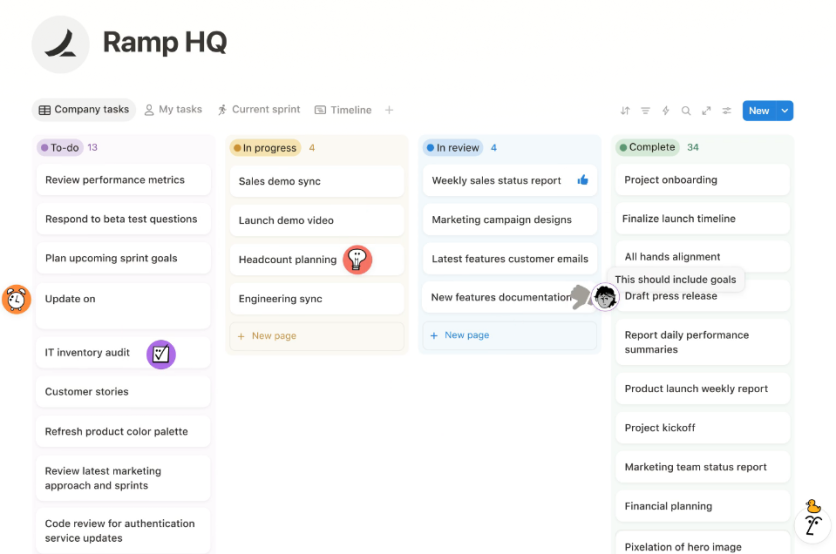
Notion has become a go-to tool for anyone who wants a more organized, flexible way to work, and Notion productivity usually starts with a well-planned workspace. When pages, databases, and Notion templates are structured intentionally, the app shifts from a simple note-taker into a true all-in-one workspace that supports both individual focus and team collaboration.
Notion Workspace Setup: Core Structure
A Notion workspace is the main container that holds pages, databases, and teamspaces. Within that space, users can build systems for tasks, projects, documentation, and wikis, removing the need for several separate tools. A clear structure is what turns Notion into an all-in-one workspace instead of just another notes app.
A simple, effective setup starts with a home page or dashboard that links to key areas such as Work, Personal, and Knowledge. Under each area, users place the main databases that drive their workflows.
This layered structure keeps the sidebar clean and makes it obvious where new information should go, which is crucial for long-term Notion productivity.
Databases: Engine of Notion Productivity
Databases are at the core of any scalable Notion system. They store structured items, tasks, projects, notes, documents, contacts, that can be filtered, sorted, and viewed in multiple ways. This is what enables robust systems like task managers, content calendars, and knowledge libraries inside one workspace.
A practical approach is to create a small set of master databases, such as Tasks, Projects, Knowledge, Docs, and Meetings.
These can be linked with relations and rollups so tasks connect to projects, meetings to clients, and documents to topics. With this relational structure, one set of data can power multiple views, Kanban boards, calendars, or tables, without duplication.
Notion Templates: Reusable Building Blocks
Database templates provide reusable structures for recurring entries. Instead of setting up each new meeting note or project page from scratch, users apply a template that pre-fills the layout and content blocks. This reduces repetitive work, enforces consistency, and strongly supports Notion productivity.
Creating a template involves designing a page inside a database with headings, checklists, and any necessary blocks, then saving it as a template.
Common examples include weekly review templates, client project pages, and meeting note layouts with agenda, decisions, and action items. In an all-in-one workspace, a well-designed set of Notion templates becomes a core asset that keeps workflows fast and predictable.
Building a Knowledge Base in Notion
A Notion knowledge base acts as a centralized wiki where processes, policies, and guides live. For teams, this is often the backbone of the workspace, cutting down on repeated questions and scattered documents. A typical setup includes a Knowledge database with tags for topic and team, plus a home page that highlights key guides and FAQs.
Templates for documentation, SOPs, and troubleshooting entries help keep content consistent. Links and backlinks build a web of related articles, making navigation natural. Over time, this structure becomes a key part of an all-in-one workspace, especially when onboarding new people or maintaining complex processes.
Notion for Team Collaboration
Notion can function as a collaboration hub where tasks, notes, projects, and docs are shared. In a team workspace, shared databases allow members to assign tasks, comment on pages, and track progress in one place.
A team dashboard can surface active projects, upcoming meetings, and important documents, all powered by the same underlying databases.
Setting up teamspaces such as Operations, Projects, and Knowledge helps define where different kinds of work live.
Permissions control who can view or edit specific areas, while shared Notion templates for projects and meetings keep formats consistent. This structure supports reliable team collaboration without sacrificing the flexibility that Notion offers.
Boosting Notion Productivity with a Structured All-in-One Workspace
A thoughtfully designed Notion workspace, built on master databases, reusable Notion templates, and a shared knowledge base, can significantly improve how people organize information and collaborate.
When individuals and teams share an all-in-one workspace, they spend less time searching for documents and more time executing on clear, repeatable workflows.
In practice, this alignment between structure, Notion productivity habits, and team collaboration is what turns Notion from a simple note tool into a durable operating system for work.
Frequently Asked Questions
1. How many databases should a beginner use in one Notion workspace?
Beginners usually do well with 3–5 core databases, such as Tasks, Projects, Knowledge, Docs, and Meetings, and can add more only when a clear recurring need appears.
2. Should personal and team work be in the same Notion workspace?
They can be in the same workspace, but it is often best to keep personal pages and databases in private sections and place shared work inside dedicated teamspaces.
3. How often should a Notion workspace be cleaned or reorganized?
Reviewing the workspace every one to three months is usually enough to archive old projects, remove unused views, and update templates without disrupting daily work.
4. Are Notion templates necessary if someone prefers free-form notes?
Templates are optional, but even free-form users benefit from a few simple templates for recurring items like meetings or projects, which reduce setup time and improve consistency.
ⓒ 2026 TECHTIMES.com All rights reserved. Do not reproduce without permission.


