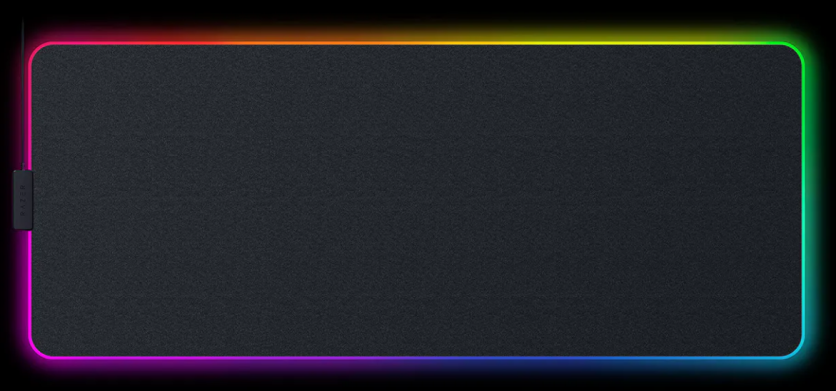
RGB mouse pads have become a staple in modern gaming setups, often paired with gaming desk lights to create immersive, visually striking environments. Products like the Razer Firefly V2 Pro showcase how far RGB aesthetics have evolved, blending lighting effects with functional hardware.
The question remains, however: do these accessories genuinely improve mousepad performance and gameplay, or are they primarily visual upgrades?
As RGB ecosystems grow more sophisticated, gamers and content creators are increasingly weighing whether these additions offer measurable benefits or simply enhance the overall look of a setup.
What Are RGB Mouse Pads and Gaming Desk Lights?
RGB mouse pads are gaming surfaces equipped with customizable LED lighting, typically integrated along the edges or across the entire pad. These devices often connect to software platforms like Razer Chroma, allowing users to synchronize lighting effects with other peripherals.
Gaming desk lights, on the other hand, refer to ambient lighting systems placed behind monitors or around desks. These lights can range from LED strips to smart lighting panels, all designed to complement RGB aesthetics and improve visibility.
Together, RGB mouse pads and gaming desk lights create a cohesive setup that emphasizes both function and visual appeal. While their primary selling point is customization, manufacturers increasingly market them as tools that can enhance the gaming experience beyond aesthetics.
Razer Firefly V2 Pro: Features and Design
The Razer Firefly V2 Pro stands out in the RGB mouse pads category due to its full-surface illumination, rather than just edge lighting. This allows for more dynamic lighting effects and deeper integration into RGB ecosystems.
Key features include:
- A micro-textured surface designed for balanced speed and control
- USB passthrough for added convenience
- High brightness LED panel with customizable zones
- Seamless integration with Razer Synapse software
From a design standpoint, the Firefly V2 Pro aims to combine mousepad performance with RGB aesthetics. The surface itself is engineered for consistent tracking, while the lighting enhances the overall desk setup. This dual focus makes it a useful case study when evaluating whether RGB accessories offer practical advantages.
Do RGB Mouse Pads Improve Mousepad Performance?
The core function of any mouse pad is to provide a consistent surface for accurate tracking. In this regard, mousepad performance depends on factors such as texture, material, and friction rather than lighting.
RGB mouse pads like the Razer Firefly V2 Pro can match or slightly exceed standard pads in performance due to their engineered surfaces. However, the RGB lighting itself does not directly improve tracking accuracy or response time.
What can influence performance includes:
- Surface uniformity, which ensures consistent sensor readings
- Glide characteristics, affecting speed and control
- Stability on the desk, preventing unwanted movement
For competitive gamers, these factors matter far more than RGB aesthetics. While high-quality RGB mouse pads can deliver excellent performance, similar results can often be achieved with non-RGB alternatives at a lower cost.
In short, RGB mouse pads can support strong mousepad performance, but not because of their lighting features.
Gaming Desk Lights and Their Impact on Gameplay
Gaming desk lights serve a different purpose. Rather than affecting input devices, they influence the visual environment around the player.
One of the main benefits is bias lighting, which reduces contrast between a bright screen and a dark room. This can help minimize eye strain during long gaming sessions. For players who spend hours in front of a monitor, this alone can make a noticeable difference.
Additional effects include:
- Improved immersion, especially when lighting syncs with in-game events
- Reduced visual fatigue in low-light conditions
- Enhanced depth perception in certain setups
However, excessive or poorly configured lighting can become distracting. Bright, rapidly changing RGB effects may draw attention away from gameplay, particularly in competitive scenarios.
Gaming desk lights are therefore most effective when used subtly, supporting comfort rather than dominating the visual field.
RGB Aesthetics vs Practical Performance
RGB aesthetics play a significant role in modern gaming culture. For streamers and content creators, lighting can enhance on-camera presentation and create a recognizable visual identity.
There is also a psychological component. A well-lit, visually cohesive setup can improve mood and increase engagement. While this does not directly boost mousepad performance, it may indirectly affect how players feel and perform.
Professional esports players, however, tend to prioritize reliability and precision over visual enhancements. Many opt for minimal setups that reduce distractions and focus entirely on performance.
This contrast highlights a key distinction: RGB accessories can improve the gaming experience, but not necessarily competitive outcomes.
Are RGB Mouse Pads Worth It?
RGB mouse pads are worth considering for users who value both performance and customization. They offer a combination of functional surfaces and visual appeal, making them attractive for casual gamers and content creators.
For strictly performance-focused users, the added cost may not be justified. Non-RGB mouse pads can deliver comparable mousepad performance without the premium associated with lighting features.
Does RGB Lighting Improve Gaming Performance?
There is no direct evidence that RGB lighting improves reaction time, accuracy, or in-game decision-making. However, it can contribute to a more comfortable and immersive environment, which may have indirect benefits.
Lighting that reduces eye strain or enhances focus can support longer, more consistent play sessions, but these effects vary by individual.
What Is the Best Surface for Mousepad Performance?
The best surface depends on the type of gameplay:
- Hard surfaces offer faster glide and are favored in fast-paced games
- Soft cloth pads provide more control and precision
RGB mouse pads like the Razer Firefly V2 Pro typically aim for a balanced surface, making them suitable for a wide range of gaming styles.
Can Gaming Desk Lights Reduce Eye Strain?
Yes, gaming desk lights can reduce eye strain when used as bias lighting. By softening the contrast between screen brightness and surrounding darkness, they help maintain visual comfort.
The key is proper setup. Lights should be positioned behind the monitor and set to moderate brightness, avoiding overly saturated or flashing colors.
Is the Razer Firefly V2 Pro Good for FPS Games?
The Razer Firefly V2 Pro performs well in FPS games due to its consistent surface and balanced glide. It supports both high and low sensitivity playstyles, offering reliable tracking across different scenarios.
While it does not provide a competitive edge through RGB features, its build quality and surface design make it a viable option for players seeking both performance and RGB aesthetics.
RGB Mouse Pads and Gaming Desk Lights: Style or Substance?
RGB mouse pads and gaming desk lights occupy an interesting space between functionality and design. Products like the Razer Firefly V2 Pro demonstrate that it is possible to combine solid mousepad performance with advanced lighting features, but the benefits are not equally distributed.
For performance alone, traditional mouse pads remain highly effective. For those who value immersion, personalization, and visual appeal, RGB aesthetics add a layer of enjoyment that extends beyond gameplay.
Ultimately, RGB mouse pads and gaming desk lights are best seen as enhancements to the gaming environment rather than essential performance tools.
Frequently Asked Questions
1. Do RGB mouse pads consume a lot of power?
No, RGB mouse pads typically use minimal power via USB, similar to a standard peripheral, so they have negligible impact on overall energy use.
2. Are RGB gaming desk lights compatible with all setups?
Most gaming desk lights are universally compatible, but advanced synchronization features may require specific software ecosystems like Razer Chroma or Corsair iCUE.
3. Do RGB mouse pads wear out faster than regular mouse pads?
Not necessarily. Durability depends on surface material and build quality rather than the presence of RGB lighting.
4. Can RGB lighting interfere with wireless mouse performance?
There is no strong evidence that RGB lighting interferes with wireless signals, as they operate on different frequencies and systems.
ⓒ 2026 TECHTIMES.com All rights reserved. Do not reproduce without permission.


