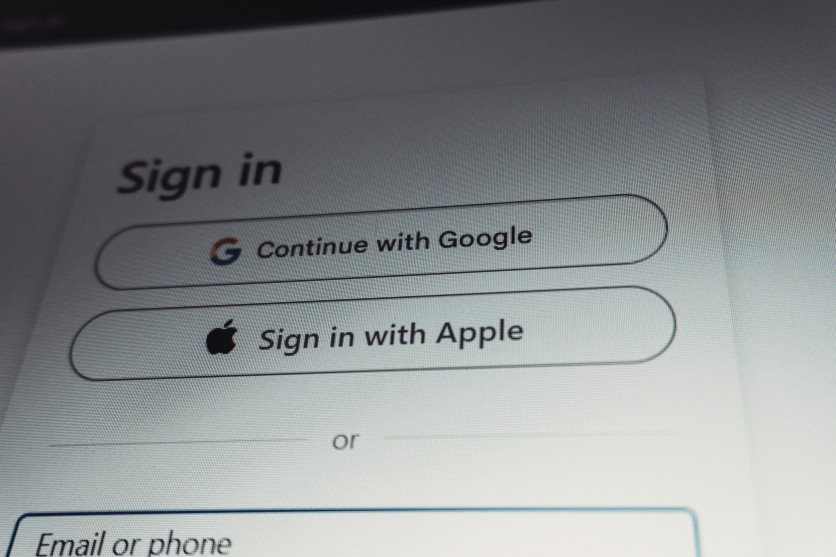
The invitation looks exactly like the ones you have received before — a cheerful message from a platform like Evite or Paperless Post, with a friend's name as host. To RSVP, all you have to do is sign in. A dropdown appears offering the familiar options: Google, Microsoft, Yahoo, AOL. The Federal Trade Commission issued a consumer alert on May 26, 2026, warning Americans that this sequence — and specifically those login options — is now the primary mechanism in one of the most active phishing campaigns in the country. Security research firm ANY.RUN has tracked the campaign's infrastructure to at least December 2025 and identified roughly 80 phishing domains and 160 suspicious links built around a single purpose: spoofing the "Sign in with Google" and "Sign in with Microsoft" interfaces that consumers recognize and trust from everyday websites.
What makes this attack more dangerous than a generic password prompt is the credential it targets. A Google or Microsoft account is not one account. It is the master key to every website where that user has ever clicked "Continue with Google" or "Sign in with Microsoft" — streaming services, banking portals, e-commerce sites, healthcare platforms, and more. Stealing one credential in this campaign does not compromise one account. It can compromise dozens.
Why Fake Party Invites Target Social Login Screens
Open Authorization, or OAuth, is the protocol that powers every "Sign in with Google" and "Sign in with Microsoft" button on the internet. When a user selects one of those options on a legitimate website, the browser redirects to Google's or Microsoft's servers, the user authenticates there, and the originating site receives a token confirming the user's identity — without ever seeing the user's password. It is a system designed for security and convenience simultaneously, and its ubiquity is precisely what makes it a target.
The fake invitation campaign does not hijack the actual OAuth protocol. Instead, it exploits the visual familiarity consumers have built up with it. After the victim clicks a link in an unexpected invitation, they arrive at a page displaying the same multi-provider login panel they have seen on thousands of legitimate websites: buttons for Google, Microsoft, Yahoo, and AOL, each with the correct logo. The page looks precisely like a site that has implemented social login. In reality, selecting any option routes the victim to a fake login screen tailored to that provider, and anything typed into it goes directly to the attacker.
This technique is not isolated. In a separate campaign documented by Microsoft's Defender Security Research Team in March 2026, researchers observed attackers abusing OAuth's own redirect mechanisms — crafting URLs that use legitimate Google and Microsoft authorization endpoints to bounce victims through to attacker-controlled pages. That campaign targeted government and public-sector organizations. Both operations converge on the same insight: the "Sign in with" interface is now one of the most trusted and therefore most exploited surfaces in consumer security.
Evite, Paperless Post, Punchbowl: The Lure That Gets the Click
The social-login spoof only works if the victim first clicks the link. That is where the fake invitation plays its role. The campaign impersonates well-known digital invitation platforms — Evite, Paperless Post, and Punchbowl — sending unexpected messages via text or email that list a recognizable name as the host. Both Paperless Post and Punchbowl have publicly confirmed awareness of the impersonation campaign and acknowledged an uptick in reports beginning around the end of 2025. Security researchers at Sublime Security, named the top security company of 2026 by Fast Company, identified Evite and Punchbowl as currently the most frequently imitated brands in invitation-based phishing attacks.
Paperless Post stated that the fake messages are not the result of any breach of its systems. The company advises that legitimate invitations will only ever come from @paperlesspost.com sender addresses, and that verified emails display a blue checkmark in supported inboxes. Punchbowl told customers that genuine invitations from its platform arrive exclusively from mail@mail.punchbowl.com. Both companies note the same complication: the fake messages sometimes originate from compromised accounts belonging to people the recipient actually knows, making the invitation appear even more convincing before any link is clicked.
Read more: WhatsApp Accounts of Government Ministers Not Spared From Russian Hackers Thru Fake Email Invitation
How the Fake Google and Microsoft Login Screens Harvest Credentials
Once a victim clicks, the attack chain documented by ANY.RUN researchers on April 22, 2026, moves through three steps.
First, the page presents a fake CAPTCHA check, often styled to resemble Cloudflare's human-verification interface. This step serves a specific function: it lowers the victim's guard by mimicking an interaction they associate with legitimate, security-conscious websites before any credential is requested.
Second, the victim is shown the multi-provider login panel. Selecting Google takes them to a spoofed Google authorization form. The stolen credentials are transmitted via server-side endpoints — for Gmail accounts, specifically through scripts named /pass.php and /mlog.php, with an additional check against a Telegram-linked user ID at /check_telegram_updates.php, indicating the stolen credentials are being routed to an operator in real time. For Microsoft, Yahoo, and AOL, the data travels through /processmail.php. In every case, the page deliberately returns a fake "Incorrect Password" error after the first submission — a calculated trick to prompt the victim to enter the password a second time, collecting two attempts in case the first contained a typo.
Third, the page intercepts the one-time verification code. After the password is captured, an authentication prompt appears asking for the code that just arrived on the victim's phone. That code is transmitted to /process.php. At this point the attacker has the password and the current one-time code, giving them everything needed to complete a real login before the code expires.
The consequences extend well beyond email. For any user who has used their Google or Microsoft account to log in to other services — a practice so common it is now the default onboarding flow on many consumer websites — those linked accounts are also reachable without a separate attack.
One Victim Lost $5,500 After a Fake Invite From a Trusted Contact
The cascading nature of social-login credential theft has already produced documented financial losses. Alexis Moser, a Southern California preschool operator, received what appeared to be an invitation from a friend she described as someone who regularly hosts fundraisers and galas. After entering her credentials and completing what appeared to be a standard multi-factor authentication step, the screen went blank. Within hours, her contacts began receiving invitations she had never sent. Days later, she found three transactions totaling $5,500 had been charged from her accounts. Her bank recovered most of the funds.
Pablo Molina, chief information officer at Drexel University, described the mechanism: once a victim enters credentials on a fake login page, those details go directly to the attacker, and the victim has no visible indication anything went wrong. His first-response advice is to contact financial institutions immediately rather than waiting to assess the full scope of what may have been accessed.
Read more: YouTube Scam: Fake YT Emails Deceive Users into Downloading Malware—How to Protect Yourself
What the Campaign Infrastructure Reveals About Its Scale
ANY.RUN's tracking of the campaign shows infrastructure built for scale and reuse. All 80 identified phishing domains share the same underlying file structure: provider logos for Google, Microsoft, Yahoo, and AOL stored under the same /Image/ path, the same form layout with only the top logo swapped, and the same server-side scripts for credential collection. A security team that identifies one domain can use that fingerprint to surface the rest.
Most domains were registered under the .de top-level domain with party- and celebration-themed names. Some pages have used Cloudflare's free hosting tier, which lends the page a security association — Cloudflare is widely known for protecting websites from attacks — while the site is itself an attack. ANY.RUN's researchers noted that some page elements suggest AI-assisted content generation, meaning new lure sites can be created and deployed quickly as older ones are identified and blocked.
The five sectors most frequently targeted are Education, Banking, Government, Technology, and Healthcare — institutions where email-linked accounts and remote administration tools are central to daily operations, and where a compromised social-login credential can open pathways well beyond the inbox.
How to Tell a Real Login Prompt From a Fake One
Legitimate invitation platforms — Evite, Paperless Post, Punchbowl — will never route you to a Google, Microsoft, Yahoo, or AOL login screen to view an invitation. Legitimate websites that use social login as an authentication method already have your account. A genuine "Sign in with Google" button on a website you already use takes you to accounts.google.com. If you arrive at a URL that does not match accounts.google.com, login.microsoftonline.com, or the official domain of the provider named, the page is a fake.
The URL check is the single most reliable test available before interacting with any login screen reached through an unexpected message. Hovering over any link in an invitation — without clicking it — previews the destination address in most email clients and browsers. The FTC notes that unexpectedness is the universal red flag: a legitimate host does not need you to log in to a third-party service just to see an invitation they sent you.
Protect Your Accounts Before and After an Attack
The FTC's May 26, 2026 alert outlines the following protective steps:
Keep security software updated. Automatic updates address new threats as quickly as they are catalogued.
Enable two-factor authentication (2FA). Even if an attacker captures a social-login password, 2FA on the underlying Google or Microsoft account adds a barrier to completing the login. Note, however, that the campaign also intercepts one-time codes — which is why acting immediately after any suspicious login prompt matters.
Act quickly if compromised. Change the password for any account whose credentials you entered, and then audit every service where you use "Sign in with Google" or "Sign in with Microsoft." Visit IdentityTheft.gov for specific next steps based on what information may have been exposed.
Report phishing attempts. Forward suspicious emails to the Anti-Phishing Working Group at reportphishing@apwg.org, text suspicious messages to SPAM (7726), and file a report with the FTC at ReportFraud.ftc.gov.
Frequently Asked Questions
How does the fake party invitation phishing scam steal social login credentials?
The scam sends a fake invitation via text or email impersonating platforms like Evite or Paperless Post. When the recipient clicks the link, they reach a page displaying spoofed "Sign in with Google," "Sign in with Microsoft," "Sign in with Yahoo," or "Sign in with AOL" buttons — the same interface they recognize from social login on normal websites. Entering credentials on any of these fake screens transmits the password directly to the attacker, along with any one-time authentication code the victim provides.
What should I do if I entered my Google or Microsoft password on a fake login page?
Change your Google or Microsoft password immediately, then review and revoke access for any third-party applications connected to that account. Contact your bank if financial accounts are linked. Visit IdentityTheft.gov for tailored recovery steps, and report the phishing attempt to the Anti-Phishing Working Group at reportphishing@apwg.org or by texting the message to SPAM (7726).
How can I tell if a "Sign in with Google" or social login screen is real?
A genuine Google login screen will always be hosted at accounts.google.com, and a genuine Microsoft login at login.microsoftonline.com. Before entering any credential on a login page reached through an unexpected message or link, check the address bar. If the URL does not match the official domain of the provider, the page is a phishing site. Real invitation platforms do not require you to authenticate with Google or Microsoft just to view an invitation.
Why is a stolen social login credential more dangerous than a stolen website password?
A social login credential — a Google or Microsoft account password — unlocks every website where the victim has used "Sign in with Google" or "Sign in with Microsoft." Unlike a stolen password for a single site, a compromised social login account gives an attacker access to every linked service without needing to run separate attacks against each one.
ⓒ 2026 TECHTIMES.com All rights reserved. Do not reproduce without permission.


